Pages and the workbench
This guide is for developers building an application with Groundskeeping. For help using an existing app, see Using a Groundskeeping app.
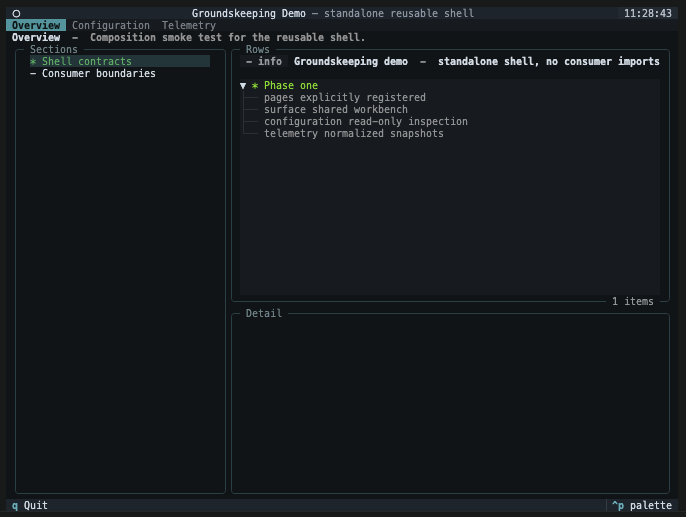
A page is an application-owned Textual widget placed inside the shared workbench. Groundskeeping mounts each page once, preserves its local state, and activates or deactivates it as the operator moves between tabs.
Design the page around a question
Start with the question the operator is trying to answer, then choose the smallest view that makes the answer easy to scan. A setup page, for example, should answer “Is this environment ready for the work I am about to run?” rather than expose every property of a service object.
| Information shape | Use | Good example |
|---|---|---|
| Peer areas | SectionNavigation |
Database, credentials, model server, runtime |
| Nested resources | CatalogueNavigation |
Provider → models, run → artefacts |
| Comparable repeated results | TableView |
Connection checks with status and latency |
| Rows the operator can toggle | SelectionTableView |
Vocabularies included in a build |
| Hierarchical readiness | TreeView |
Environment → service → individual check |
| No result or a useful failure | EmptyView |
“No models configured” with a setup action |
| Work still running | LoadingView |
Refreshing provider inventory |
| Facts about the highlighted row | KeyValueView |
Endpoint, last checked, and failure reason |
| Explanatory detail | TextView |
Recovery guidance or policy explanation |
Translate application objects before they reach the workbench. A page can know about a Groundworkers resource or an evaluation run; TableView and TreeView should only receive presentation-safe values.
Understand the screen layout
| Screen area | Supplied by |
|---|---|
| Top tabs | OperatorAppSpec.pages through PageRoute and PageRegistration |
| Left pane | The active page's SectionNavigation or CatalogueNavigation |
| Upper-right pane | The active page's SurfaceView |
| Lower-right pane | Optional TextView, KeyValueView, or detail TableView |
| Buttons above a view | That view's ViewAction values |
Use OperatorAppSpec.workbench_labels when the shared pane chrome needs application language, such as Checks instead of Rows. Page-specific titles still belong on navigation and view models.
Extend the stylesheet
OperatorApp loads the packaged theme from an absolute path, so a subclass keeps it wherever the consuming package lives. Add application rules through Textual's CSS class variable; it is read separately and layers over the theme.
class GroundworkersApp(OperatorApp):
    CSS = """
    #wizard-body TextArea { height: 12; }
    """
The same hook covers sizing the packaged theme fixes for one shape of terminal. Wizard buttons keep a uniform 14-cell minimum, which needs about 94 columns for all five to fit; #wizard-buttons Button { min-width: 10; } lets the strip shrink to its labels and fits from about 72.
Do not re-declare CSS_PATH in a subclass. It replaces the packaged theme rather than adding to it, and a relative path there is resolved against the consuming package.
Register routes at startup
PageRoute is the stable identity of a page. Its label appears in navigation and its purpose tells the operator what the page is for.
from groundskeeping.contracts import PageRegistration, PageRoute

DATABASE_ROUTE = PageRoute(
    key="database",
    label="Database",
    purpose="Inspect the connection and confirm the required schemas are ready.",
)

registration = PageRegistration(
    route=DATABASE_ROUTE,
    factory=lambda context: DatabasePage(database_service),
)
OperatorAppSpec.validate() rejects an empty registry, duplicate route keys, reused page factories, unknown action page keys, and an unknown default_page. The application therefore fails during construction rather than after an operator selects a tab.
Implement the page lifecycle
A page receives a narrow PageContext, not the whole app.
| Method | When it is called | Typical responsibility |
|---|---|---|
activate |
The page becomes visible | Start a safe refresh or resume page-local timers. |
deactivate |
The operator leaves the page | Stop page-local timers or subscriptions. |
build_navigation |
The page is rendered | Return the current left-pane model. |
landing_view |
The page is rendered | Return the initial result surface. |
navigation_selected |
A section or catalogue item is chosen | Render its result view. |
action_selected |
A visible action button is pressed | Run an action or open a wizard. |
row_highlighted |
The cursor moves to a result row | Render lightweight detail. |
row_selected |
A result row is activated | Perform the page-defined selection behavior. |
Use the context to update only the shared surfaces you need:
def row_highlighted(self, row_key: str, context: PageContext) -> None:
    check = self._checks[row_key]
    context.surface.show_detail(
        self.route.key,
        KeyValueView(
            title="Check detail",
            rows=(
                ("Status", check.status),
                ("Last checked", check.checked_at.isoformat()),
                ("Guidance", check.guidance),
            ),
        ),
    )
For an ordinary data refresh, use context.surface.refresh_view() with a TableView.
Groundskeeping updates existing cells in place, reconciles added and removed rows, and
keeps the highlighted row by its stable TableRow.key without re-entering row_highlighted().
If that row was removed, the cursor remains at the nearest surviving position. This also
leaves the current section navigation untouched:
context.surface.refresh_view(self.route.key, self._current_jobs_view())
Use show_view() when changing surfaces or intentionally resetting the table. The shared
Workbench also exposes the focused Workbench.refresh_rows(view) method for consumers that
compose the widget directly.
If landing_view() raises, the shell replaces it with an explanatory EmptyView instead of taking down the application. Still catch expected domain failures in the page so you can give the operator specific recovery guidance.
Handle selectable tables
Use SelectionTableView when row state is itself an input. The workbench owns toggle behavior, disabled rows, and single, multiple, or all_or_specific modes. Stable row keys let the page keep selection state independently of row order.
Implement the optional SelectionAwareOperatorPage.selection_changed() hook when the page needs the complete selected-key set. Pages without the hook continue to receive row_selected().
Add actions and wizards
A ViewAction belongs to the view where its effect makes sense. Keep labels concrete—Test connection tells an analyst more than Execute—and expose only the small set of actions relevant to the current result.
Use actions for bounded commands. When setup needs several related answers, call PageContext.open_wizard(). Configuration changes should use the generic configuration workflow, which already handles branch invalidation, redacted review, revision conflicts, and terminal results.
Start with a read-only page and one verification action. Add durable writes after the page can clearly show current state, failures, and the effect of a successful change.